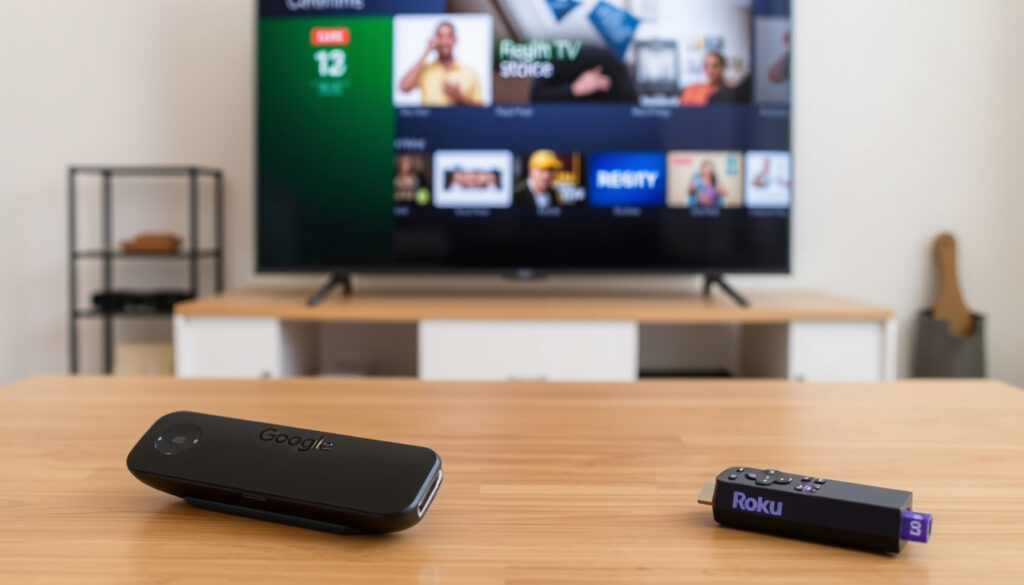
Google TV vs Roku: Which streaming platform is better
You’ve probably stood in an electronics aisle wondering whether to grab a Google TV or Roku device. Both stream your favorite shows, but they approach the experience very differently. This guide breaks down the real trade-offs between Google TV and Roku in 2025, focusing on free content, cost, and which platform suits your habits.
Roku active accounts (2024): over 80 million ·
Google TV monthly active devices: over 110 million ·
Roku OS market share in US streaming players: approximately 38% ·
Google TV free ad-supported channels: over 800 ·
Roku Channel free ad-supported content: over 350 live TV channels ·
Year Google TV launched: 2020
Quick snapshot
- Which platform will receive software updates longer (Pocket-lint)
- Exact total app count per platform (varies by region and device) (ZDNet)
- Future of Google TV or Roku as stand-alone platforms (Roku)
- 2020: Google TV reboots Android TV interface (Engadget)
- 2024: Roku OS 12.5 released; Google TV adds Freeplay (Android Central)
- 2026: Google TV Freeplay now 316 channels after updates (Pocket-lint)
- More integration: The Roku Channel content will appear deeper in Google TV’s Live tab (Android Central)
- Free channel arms race likely to continue between both platforms (Pocket-lint)
Five key facts, one pattern: Google TV and Roku diverge on ecosystem philosophy — one is a search-and-personalize engine, the other a no-fuss appliance.
The data shows a clear trade-off: Google TV prioritizes breadth through aggregation while Roku focuses on a curated, single-app experience.
| Attribute | Google TV | Roku |
|---|---|---|
| Launch year | 2020 (reboot of Android TV) | 2008 |
| Voice assistant | Google Assistant | Roku Voice (limited) and Apple AirPlay |
| Free live TV channels | 800+ (via Freeplay and third-party apps) | 350+ via Roku Channel (over 500 as of 2026) |
| 4K HDR support | 4K, HDR10, Dolby Vision (depending on device) | 4K, HDR10, Dolby Vision (depending on device) |
| Gaming apps | Yes (Google Play Store) | Limited (no native gaming store) |
Is Google TV better than Roku?
Interface and personalization differences
Google TV serves personalized recommendations based on your viewing habits, powered by Google Assistant integration (Engadget). Roku, by contrast, keeps its home screen simple and neutral — no algorithmic content pushing beyond the user’s app grid (Roku). For new buyers, the choice is between a platform that learns you versus one that gets out of your way.
App and content library comparison
Both support major streaming apps — Netflix, Hulu, Disney+ — but Google TV opens the door to the Google Play Store, where you can download games and utility apps (ZDNet). Roku’s app store is more restrictive, focused on streaming channels only. Some niche streaming apps are still exclusive to one platform.
Search and voice control capabilities
Google TV’s universal search scans across apps using Google Assistant, surfacing results with direct playback links (Engadget). Roku’s search is also universal but lacks the same natural language depth — it relies on a text-based interface and limited voice commands.
What is the downside of Google TV?
Advertising and data privacy concerns
Google TV shows ads on the home screen and collects usage data to personalize recommendations (ZDNet). Roku also serves ads, but does not tie them to a personal Google account — a meaningful difference for privacy-conscious streamers.
Performance issues on lower-end hardware
Lower-cost Chromecast with Google TV models can feel sluggish when navigating menus or launching apps (Pocket-lint). Roku devices at the same $25–$30 price point tend to feel snappier thanks to a simpler OS.
Limited support for some apps and regions
Some region-specific apps (like certain UK catch-up services) launch on Roku before Google TV, and vice versa (ZDNet). If you live outside the US, check which platform has the local channels you need.
Google TV’s personalization comes at the cost of system resources and ad targeting. Buyers who value snappy performance above recommendations should lean toward Roku.
Is Google TV a Roku TV?
Definition of Google TV as a software layer
Google TV is a software interface that runs on top of Android TV — not a separate operating system (Engadget). Think of it as a skin that adds personalized recommendations and a unified watchlist to the underlying Android TV platform.
Roku as an operating system and hardware ecosystem
Roku is a proprietary operating system that Roku designs and licenses to TV manufacturers (Roku). It powers Roku-branded streaming sticks, boxes, and TVs sold by TCL, Hisense, and others. A TV can run either Google TV or Roku OS — but never both at the same time.
Relationship between Android TV and Google TV
Android TV is the underlying OS; Google TV is the interface overlay (ZDNet). A TV running Android TV can often be upgraded to Google TV via a software update.
Is Google TV worth buying?
Cost vs. features: entry-level vs. high-end devices
Google TV devices start at under $30 for the Chromecast with Google TV (HD), while Roku devices range from $25 to $100 (Roku). For the same $30, a Roku Express may feel faster, but a Chromecast with Google TV unlocks access to Google Play games.
Integration with Google ecosystem
Google TV integrates deeply with Google services: Google Photos screen savers, Google Assistant smart home controls, and Google Workspace calendar syncing (Engadget). If you rely on Google’s ecosystem, Google TV is the natural fit.
Long-term software updates and support
Roku has a strong track record of updating older devices for years after release (Roku). Google TV’s update lifespan varies by manufacturer — Google’s own Chromecast gets consistent updates, but third-party TV makers may lag.
For shoppers already using Gmail, Google Photos, and Google Assistant, Google TV’s integration justifies the cost. For everyone else, Roku offers a simpler path at a similar price.
What channels and live TV can you get on Google TV?
Free ad-supported channels on Google TV
Google TV Freeplay initially aggregated over 800 free channels (Engadget), though recent counts show 316 channels as of July 2026 (Pocket-lint). The Live tab also pulls in free content from Pluto TV, Tubi, and now The Roku Channel (Android Central).
Live TV via YouTube TV, Sling, and other services
Google TV supports subscription live TV services including YouTube TV, Hulu + Live TV, and Sling TV (ZDNet). Roku offers the same services, plus its own The Roku Channel with over 350 free live TV channels (Roku Blog).
Comparison to Roku’s free channel offerings
Roku’s free ecosystem centers on The Roku Channel, which offers over 80,000 free movies and shows plus 500+ live TV channels as of 2026 (Roku). The new integration means Google TV users can now access Roku’s free content through the Live tab, blurring the line between platforms.
Does Google TV have a monthly fee? Is Netflix free?
One-time purchase vs. recurring costs
Google TV has no monthly platform fee — you buy the device once (Engadget). Roku works the same way: no subscription required to use the platform. Both devices need internet, which costs whatever your ISP charges.
Free content availability and subscription services
Netflix is not free on either platform — you must pay for a subscription starting at $6.99/month with ads (ZDNet). Both platforms offer free ad-supported content: Google TV through its Freeplay hub and third-party apps, Roku through The Roku Channel.
Hidden costs: internet and premium subscriptions
To use any streaming platform, you need internet and individual subscriptions for premium services (Roku). The total cost of ownership depends on your chosen subscriptions, not the platform itself.
Neither platform charges a monthly fee. Your ongoing costs are internet service and any premium streaming subscriptions you choose.
Which Google TV device is the best?
Chromecast with Google TV (HD vs. 4K)
The Chromecast with Google TV (4K) at $50 is the most popular dedicated streaming device (Engadget). The HD version costs $30 but lacks 4K HDR support — a trade-off for budget buyers.
Google TV on Sony, TCL, and other smart TVs
Sony Bravia XR and TCL TVs offer built-in Google TV with varying performance (ZDNet). Higher-end models include faster processors and better upscaling, while budget TCL models may feel slower.
Third-party devices: Walmart Onn, Nvidia Shield TV Pro
The Walmart Onn 4K Pro ($30) runs Google TV with a faster chip than Chromecast (Pocket-lint). Nvidia Shield TV Pro ($200) offers the most powerful Google TV experience with AI upscaling and gaming support (Engadget).
Cheaper Google TV devices can feel sluggish compared to similarly priced Roku sticks. If performance matters, spend at least $50 on a Chromecast 4K or consider a third-party device like the Onn 4K Pro.
entertainmentnow.com, techradar.com, roku.com, thestreet.com, play.google.com
Frequently asked questions
Does Google TV support Dolby Atmos?
Yes, Google TV supports Dolby Atmos on compatible devices and content (Engadget). Roku also supports Dolby Atmos on select players.
Can I sideload apps on Google TV?
Yes, because Google TV runs on Android TV, you can sideload APK files from a computer (ZDNet). Roku does not allow sideloading.
How often does Roku receive updates?
Roku typically issues major OS updates once or twice a year, with security patches in between (Roku). Older devices may receive updates for 4–5 years after release.
Which platform has more 4K content?
Both platforms offer the same streaming services, so the amount of 4K content is identical — it depends on your subscriptions (Engadget).
Is Google TV the same as Android TV?
No. Google TV is the interface that runs on top of Android TV (ZDNet). Many Android TV devices have been updated to Google TV.
Can I use a Roku remote with a Google TV?
No, Roku remotes use a proprietary protocol and are not compatible with Google TV (Roku). You need a Google TV-compatible remote.
Do both support Apple AirPlay?
Yes, both Google TV and Roku support Apple AirPlay, allowing you to stream from iPhone or Mac (Engadget).
The decision comes to one thing: how much personalization you want. Google TV learns your habits, aggregates free channels from multiple sources, and integrates with your Google account. Roku gets out of your way, feels faster at lower prices, and wraps its free content in one tidy app. For buyers living inside Google’s ecosystem, Google TV is the obvious choice. For everyone else — especially those who want a streaming device that just works without tracking you — Roku remains the reliable alternative. The gap is closing fast, thanks to Roku’s content appearing inside Google TV’s Live tab. In 2025, neither platform is strictly better; the right pick depends on how much you want your TV to know you.
More related posts
 Cast Of Reservation Dogs
 Soundbar Mount: Installation, Compatibility & Best Picks
 Mare Of Easttown Cast
 Watch Rain Man: Streaming, Rent, Buy & Is It Worth It
 Movies That Serve Food: Iconic Food Scenes & Cinema Dining Guide
 One Of Them Days Cast
 Cast Of Bone Tomahawk
 Karen Gillan: Biography, Age, Husband, and Movies
