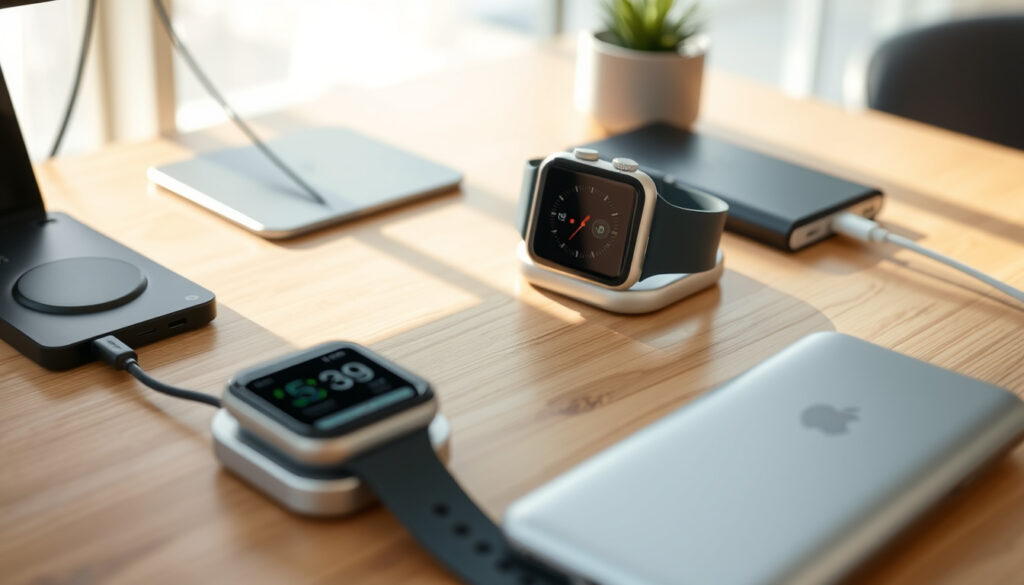
How to Charge an Apple Watch: Complete Guide to Every Charging Method
Every Apple Watch owner eventually asks the same question while staring at a dark screen: did I charge this thing right? The magnetic charger is almost foolproof, yet the details still catch people out. The official method fills the battery in about 1.5 to 2.5 hours, travel-safe alternatives exist, and a watch that won’t charge is often a quick fix. If the battery itself is the problem, replacement pricing runs roughly $79 to $129 — worth knowing before you panic.
Apple Watch models supported: Series 1 to Series 9 and Ultra · Charging method: Magnetic inductive · Full charge time: About 1.5 to 2.5 hours · Battery lifespan: About 3 years · Replacement cost (out of warranty): $79 to $129
Quick snapshot
- Apple’s official guidance: charge with the magnetic cable that came with the watch (Apple Support (official charging guidance)).
- Charging is inductive — no port, no pins, no cable to insert into the watch. (Apple Support (official charging guidance))
- A full charge takes about 1.5 to 2.5 hours. (Apple Support (official charging guidance))
- Exact charge time varies by model and by whether the watch is in use while charging.
- Third-party charger performance isn’t independently tested; MFi certification is the only formal signal.
- After a DIY battery swap, water resistance is unverified.
- A fully drained watch can take up to 30 minutes before the charging symbol appears (Apple Support (official charging guidance)).
- iFixit’s rule of thumb: give a stubborn watch a full hour on the charger. (Apple Support (official charging guidance))
- Then expect 1.5 to 2.5 hours to 100%. (Apple Support (official charging guidance))
- If cleaning and a restart fail, battery service is the next step. (US Apple Watch battery price list)
- With AppleCare+, battery service costs $0 (US Apple Watch battery price list).
- Without coverage, US prices run $79 to $129 depending on model. (US Apple Watch battery price list)
A few key numbers cover charging time, battery life, and repair costs; the process details follow.
| Fact | Value |
|---|---|
| Standard charge time | 1.5 to 2.5 hours |
| Dead-watch delay before charging indicator | Up to 30 minutes |
| Alternative charging devices | iPhone 15 series, iPad with USB-C |
| Battery lifespan | ~3 years |
| Replacement cost (out of warranty) | $79 – $129 |
| Third-party charger requirement | MFi certification |
| Force restart | Hold side button + Digital Crown for 10 seconds |
How to Charge Apple Watch
Charging an Apple Watch takes about five seconds of actual effort. The magnetic puck snaps onto the flat back of the case, and Apple’s guidance is explicit: use the cable that came with the watch, connect it fully into a USB power adapter, and plug the adapter fully into a wall outlet.
Charging with the magnetic charger
- Works with every Apple Watch generation, from Series 1 to Ultra.
- The magnets align the charger automatically — you can’t attach it the wrong way.
- Connect the magnetic charging cable that came with your watch to a USB power adapter, then plug the adapter into a wall outlet.
- Hold the charger against the back of the watch. The magnets pull it into place with a soft click.
- Wait for the lightning bolt to appear on the watch face — Apple’s visual confirmation that charging has started.
- Leave it until the battery icon is full, about 1.5 to 2.5 hours.
Charging with the USB-C Magnetic Fast Charging Cable
- Apple’s authorized list includes two cables: the standard magnetic cable and the USB-C Magnetic Fast Charging Cable.
- Both attach the same way; the USB-C version plugs into modern adapters, power banks, and laptops.
The motion is identical: connect to USB-C power, snap the magnet to the back of the watch, and wait for the lightning bolt. The USB-C version is the better travel companion because it shares a cable standard with most laptops, tablets, and power banks sold today.
The pattern across every Apple Watch generation is the same: the charger does the alignment, and the watch tells you when it’s working. If you don’t see the lightning bolt, the issue is almost always a dirty back, a tired adapter, or a deeply drained battery.
Is There Anything Else I Can Charge My Apple Watch With?
If you left the puck at home, you still have options. None of them replaces the official cable for daily use, but two of them can get you out of a jam, and the third is worth a look for travel.
Charging with an iPhone
- The iPhone 15 series can reverse-charge an Apple Watch wirelessly.
- Place the watch face-up on the back of the phone, so the watch’s back aligns with the phone’s charging area.
- Treat it as an emergency top-up, not a full charging routine.
Reverse wireless charging turns the phone into a charging pad. It’s slow, but it’s enough to get a dead watch from zero to showing the time again — useful when you’re away from a wall outlet.
Charging with an iPad
- Any iPad with a USB-C port can feed power to the watch.
- Plug the USB-C magnetic charging cable directly into the iPad.
- The iPad supplies the power, so plug the iPad in if you can; otherwise it drains the tablet.
No extra hardware is needed — just the USB-C magnetic cable and an iPad with a USB-C port. It’s a solid fallback on a trip where the iPad is already in your bag.
Third-party alternatives
- Only MFi-certified chargers are licensed by Apple.
- The MFi badge is the pass/fail test for off-brand pucks and charging stands.
- Avoid random magnetic docks that stick to the watch but carry no certification.
Cheap magnetic pucks will physically stick to any Apple Watch — that’s just magnets. The MFi certification is what tells you Apple approved the electronics inside. Without it, charging can be slow, erratic, or fail entirely.
Magnet alignment proves nothing about electronics. A $9 puck that snaps into place can still starve the watch of power; the MFi certification is the only meaningful signal.
For travelers, the USB-C magnetic cable plus a small power bank covers the airport, the hotel, and the rental car — one cable, every power source.
The trade-off is straightforward: iPhone and iPad charging work in a pinch, but both drain another device. The original cable stays the most dependable method, and for travel the USB-C magnetic cable plus a compact power bank covers every scenario.
Why Is My Apple Watch Not Charging?
A watch that won’t charge is rarely broken. In most cases the cause is a loose connection, a dirty backplate, or an adapter that’s too weak. Work through these checks in order before you book anything.
Check the charger and cable
- Push the cable fully into the USB power adapter, and the adapter fully into the outlet.
- Some chargers ship with a plastic wrap on the surface; peel it off if present.
- Try a different Apple Watch cable and a different USB power adapter if you have spares.
- Prefer a wall outlet over a laptop port: iFixit notes that laptop USB ports can deliver weaker power (iFixit’s troubleshooting guide).
Check the watch back
- Wipe the back of the watch and the charger with a soft, dry cloth.
- Sweat, sunscreen, and soap film are the usual suspects blocking the charge.
- If the back is visibly scratched or the charger surface is damaged, test with another cable before blaming the watch.
Restart the watch
- Force restart: press and hold the side button and the Digital Crown together for at least 10 seconds.
- Release when the Apple logo appears.
- Place the watch back on the charger and watch for the lightning bolt.
A force restart clears the sort of firmware hang that can stop the watch from starting a charge. If the Apple logo appears, the hardware is alive — the problem was software, not the battery.
Most “not charging” cases end with a cloth, a restart, or a different adapter. The repair bill only becomes relevant after these fail.
The pattern in Apple’s own troubleshooting is to escalate from the cheapest possibility — dirt, plastic film, weak adapter — to a restart. Follow that order and you won’t pay for a service visit that a five-minute cleanup would have solved.
How to Revive a Dead Apple Watch?
If the screen is completely black, the battery may simply be empty. Apple states that a fully drained Apple Watch can take up to 30 minutes before the charging bolt appears. Give it time before assuming the worst.
- Connect the watch to its charger and leave it connected for at least 30 minutes.
- If nothing appears, keep it there for a full hour — iFixit’s troubleshooting guide treats one hour as the point where you can tell whether charging will start at all (iFixit’s troubleshooting guide).
- Force restart: hold the side button and Digital Crown together for 10 seconds, release on the Apple logo.
- Leave it on the charger for another 30 minutes and check again.
A black screen on a deeply drained watch is not a dead watch. The display can stay dark while the battery quietly takes charge — the lightning bolt is the signal to wait for, not the screen coming alive.
What this means in practice: the single most useful habit is to give a lifeless watch a full hour on a known-good charger before you conclude anything. The watch usually wakes up on its own.
What Is the Lifespan of an Apple Watch Battery?
The built-in battery is designed to last about three years with typical use. That’s not a hard expiry — it’s the point where capacity has faded enough that the watch stops comfortably lasting a full day.
- Typical lifespan: about 3 years.
- Decline is gradual: the watch works, but the day ends earlier.
- Battery service resets the clock for a fraction of a new watch’s price.
Battery wear is chemistry, not a defect. Every charge cycle reduces capacity a little, and Apple’s service option exists precisely because the cell is replaceable while the watch itself is still perfectly good.
The number that matters isn’t the calendar — it’s runtime. A watch that dies before your day ends, week after week, is telling you the battery is at the end of its service life.
The care principle isn’t unique to smartwatches. Mechanical watches need regular maintenance too, and our guide to self-winding watches looks at maintenance from the same repair-versus-replace angle.
For most owners, a three-year-old battery is the first real decision point, and the choice is between a service fee and a new watch.
Is It Worth Replacing an Apple Watch Battery?
A lithium-ion battery sealed inside the case leaves three routes: Apple service, a third-party repair, or a DIY swap. The right answer depends on the model, the warranty, and your comfort with small electronics.
Replacement cost
- Apple’s out-of-warranty fee varies by model and region (Apple’s repair pricing page).
- In the US, a parts-tracking price list reports $79 to $99 for most Apple Watch models (US Apple Watch battery price list).
- iFixit puts Apple’s typical service at about $99 and says a DIY swap saves $49 to $79 (iFixit’s battery replacement wiki).
- Regional pricing changes the math: a Japan-specific list reports a flat ¥17,400 out-of-warranty fee across models (Japan Apple Watch battery price list).
- With AppleCare+, battery service is $0, as the snapshot above shows.
Pros and cons of replacing
- Service bill: $79 to $129 · Typical DIY saving: $49 to $79.
Upsides
- Much cheaper than a new watch — the service bill is a fraction of any current model’s price.
- The watch keeps its bands, its finish, and its case; only the cell changes.
- AppleCare+ drops the fee to $0.
- DIY parts are affordable: most replacement batteries run $20 to $37, with the Ultra around $45 (per iFixit’s wiki).
Downsides
- The $79 to $129 bill can approach the trade-in value of an older watch.
- Apple’s service may take several days and a shipping fee may be added.
- Opening the case yourself puts water resistance at risk.
- On a several-generations-old watch, the smarter move is often upgrading, not repairing.
The same repair-versus-replace logic applies beyond smartwatches. When a repair bill starts approaching the item’s remaining value, replacement wins — a calculation we work through in our Chanel watch guide for a very different price bracket.
Confirmed Facts vs. What’s Unclear
Confirmed facts
- Apple Watch uses magnetic inductive charging, and the official method is the cable that came with the watch.
- iPhone 15 series can reverse-charge a compatible Apple Watch.
- An out-of-warranty battery service in the US runs about $79 to $129 depending on model.
- A force restart (side button + Digital Crown, 10 seconds) is the standard fix for a watch that won’t respond.
What’s unclear
- Exact charging time varies by model and how the watch is being used; no single universal figure exists.
- Third-party chargers lack independent performance testing; MFi certification remains the only formal signal.
- Whether a DIY battery replacement preserves water resistance is unverified.
The split matters because it steers your money: the confirmed fixes are cheap and fast, while the uncertain territory — third-party chargers, DIY battery swaps — is where the risk sits.
Charging Advice From Apple and iFixit
Both sources are worth quoting because they approach the same topic from different angles — Apple from the official manual, iFixit from the repair bench.
Use the Apple Magnetic Charging Cable or USB-C Magnetic Fast Charging Cable that came with your watch.
Apple Support — official charging documentation
An out-of-power Apple Watch may take up to 30 minutes before the lightning bolt appears.
Apple Support — official charging documentation
Plug the charge cable into a wall outlet rather than a laptop USB port for more consistent power input.
iFixit — Apple Watch troubleshooting wiki
Doing the battery replacement yourself typically saves $49 to $79 versus Apple’s out-of-warranty service.
iFixit — Apple Watch battery replacement wiki
The common thread: both sources treat the charger as the least likely failure point — the power source and the battery are where the trouble usually lives.
For most Apple Watch owners, the whole charging system comes down to one cable and one habit: keep the magnetic puck with your travel kit, and give a drained watch a full hour before calling it dead. That habit alone will save most people a service fee. For anyone who travels with an Apple Watch, the choice is clear: pack the USB-C magnetic cable and a small power bank, or you’ll be the person at the gate balancing a watch against an iPhone, waiting to see if it charges.
support.apple.com, support.apple.com, apple-parts.trackit.co.in, simplymac.com, iphonelife.com, engadget.com, 9to5mac.com, anker.com
Frequently Asked Questions
How do I manually pair my Apple Watch?
Open the Watch app on your iPhone, tap All Watches, then tap Pair New Watch. Hold the iPhone over the watch’s pairing animation, or tap Pair Manually, and follow the on-screen steps.
Does Best Buy replace Apple Watch batteries?
Best Buy has offered Apple Watch battery replacement through its Geek Squad service in the US, but availability and pricing vary by location. Call your nearest store to confirm before you take the watch in.
How do I know if my Apple Watch needs a new battery?
The clearest sign is runtime: if the watch no longer lasts through a typical day, or drains far faster than it did in its first year, the battery is approaching the end of its service life.
Can I replace the battery on my Apple Watch myself?
Yes, but it requires opening the case, and water resistance may not survive the job. iFixit sells kits and guides and estimates a typical saving of $49 to $79 compared with Apple’s service, with batteries costing about $20 to $37.
How to charge Apple Watch Series 3?
Exactly like every other model: place the magnetic charging cable that came with the watch against the back of the case, wait for the lightning bolt, and leave it until the battery icon is full.
How to charge Apple Watch Series 1?
The same magnetic process applies: snap the charger to the back, wait for the lightning bolt, and expect a full charge in roughly 1.5 to 2.5 hours.
How to charge Apple Watch with iPad?
If your iPad has a USB-C port, plug the USB-C magnetic charging cable directly into the iPad and attach it to the watch. It uses the iPad’s battery, so plug the iPad into power if you can.
More related posts
 Timothy Simons Movies and TV Shows Guide
 The Amateur Cast: Who Stars in the 2025 Spy Thriller
 Cast Of Caught Stealing (film)
 Lioness Season 3: Is It Happening? Streaming Guide & Reviews
 How to Add Apps to Samsung Smart TV: Step-by-Step Guide
 Samsung Remote App: Turn Your Phone Into a TV Remote
Cast Of The Walking Dead Daryl Dixon
Samsung Remote App: Turn Your Phone Into a TV Remote
Cast Of The Walking Dead Daryl Dixon
 Cast Of The Last Voyage Of The Demeter
